Why a Golf Simulator for Beginners Changes Everything About Learning the Game
Walking into a golf simulator bay for the very first time can feel a little intimidating. There are screens, sensors, launch monitors, and data readouts everywhere you look. We get it — we see that wide-eyed expression almost every day at our Grip It & Rip It Golf indoor facility in Palestine TX. But here is the thing most people do not realize: a golf simulator for beginners is actually one of the most forgiving, low-pressure environments you could ever choose to learn golf indoors. There are no strangers watching you on a crowded driving range. There is no blistering East Texas heat bearing down on you. You just step up, swing, and let the technology guide you. The problem is, first-time golfers often make a handful of rookie mistakes that slow down their progress and limit the incredible value a simulator offers. We have helped hundreds of new golfers and first-time golfers avoid these pitfalls, and we want to share everything we have learned so your very first session is a productive, enjoyable one.
Mistake #1 — Skipping the Basics of How to Use a Golf Simulator
The single most common mistake we see at our Palestine Texas golf simulator facility is players who walk in, grab a driver, and start swinging as hard as they can without understanding a single thing on the screen. Learning how to use a golf simulator before you start smashing balls makes every session exponentially more valuable.
Understanding the Screen, the Launch Monitor, and What the Numbers Mean
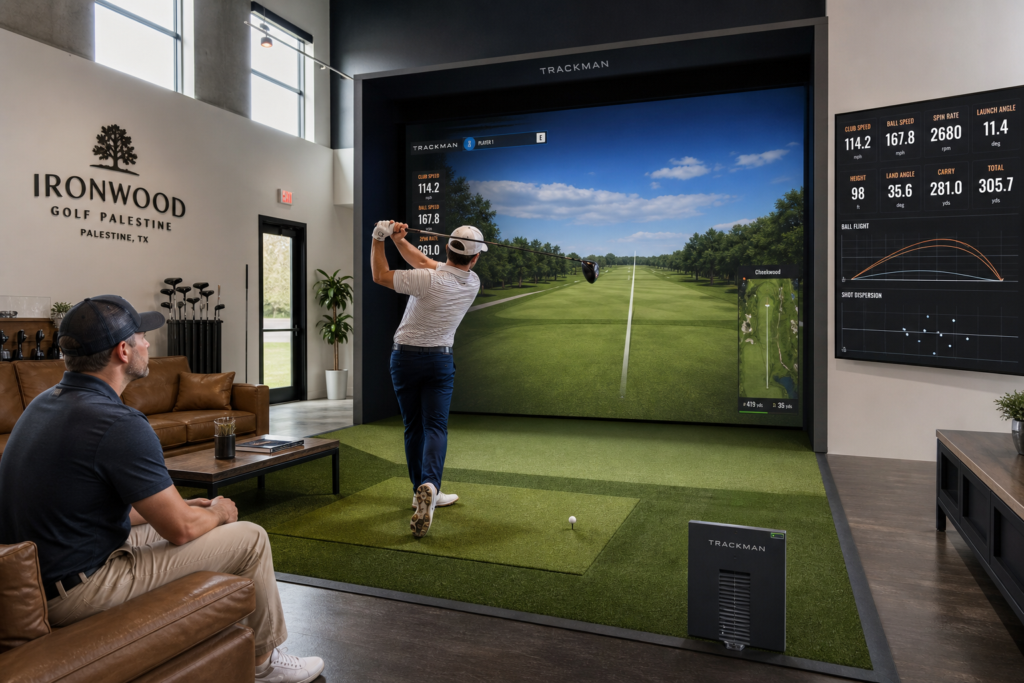
A modern indoor golf simulator relies on golf simulation technology that captures dozens of data points every time you strike the ball. At Grip It & Rip It Golf indoor facility, we use high-end launch monitor systems that measure ball speed, club speed, launch angle, spin rate, and club path in real time. Each of these numbers tells a story about your swing, and if you ignore them, you are essentially practicing blind.
Here is a quick primer on the key metrics you should pay attention to during your first session:
– Ball speed tells you how much energy transferred from the club to the ball at impact. Higher is generally better, but control matters more for beginners.
– Club speed measures how fast your clubhead is moving through the impact zone. It is tempting to chase high numbers, but accuracy should come first.
– Launch angle shows the vertical angle the ball leaves the clubface. Too high or too low, and you lose distance and accuracy.
– Spin rate reveals how much backspin or sidespin the ball carries. Excessive spin often explains those mysterious slices and hooks.
– Club path indicates whether you are swinging inside-out, outside-in, or on a neutral path. This is one of the most valuable golf swing data points for diagnosing problems.
We always encourage new visitors to spend the first five to ten minutes of their session with one of our team members who can walk through these readouts. Think of it as a getting started guide for your first simulator session — a few minutes of orientation saves you hours of confusion down the road.
Use Beginner-Friendly Golf Simulator Settings
Most simulator software includes beginner-friendly golf simulator settings that simplify the on-screen display and reduce information overload. At our facility, we can adjust the interface so you see only the metrics that matter most for your skill level. We can also set up practice modes and skill challenges that focus on one aspect of your game at a time, rather than throwing every stat at you simultaneously. If you are brand new, ask us to configure these settings before you start. It makes the experience far less overwhelming and far more productive.
Mistake #2 — Trying to Crush Every Shot Instead of Learning to Practice Golf Swing Fundamentals
We cannot tell you how many times we have watched a first-time golfer grab the biggest driver in the bag and try to hit the ball into orbit. It is human nature — the screen shows a beautiful realistic golf course stretching out in front of you, and your instinct says “send it.” But chasing maximum distance before you have learned basic swing mechanics is a recipe for frustration and, worse, bad habits that become incredibly difficult to break later.
Why Short Game and Putting Practice Matter More Than You Think
Here is a statistic that surprises almost every beginner we work with: roughly 60 percent of all strokes in a round of golf happen within 100 yards of the green. That means short game and putting practice is where you will lower your scores the fastest. Our indoor golf simulator features dedicated short game modes that let you practice chipping, pitching, and putting on realistic golf courses without ever leaving your hitting bay. Spending even 15 minutes per session on your short game will accelerate your improvement dramatically compared to spending an entire hour pounding drivers.
We recommend splitting your first few sessions like this:
– 10 minutes of warm-up with a mid-iron (7-iron is perfect)
– 15 minutes of short game and putting practice
– 15 minutes of full-swing work with various clubs
– 10 minutes of fun — play a hole or try golf simulator games and modes
– 10 minutes reviewing your golf swing analytics with a staff member or on your own
This balanced approach lets you practice golf swing mechanics across your entire bag while keeping the session engaging and varied.
Let the On-Screen Swing Feedback Guide You
One of the greatest advantages of using a golf simulator for beginners over a traditional outdoor range is the instant feedback you receive after every single shot. On a regular driving range, you watch the ball fly and guess what happened. Inside a simulator, you get on-screen swing feedback that tells you exactly what your club and the ball did at impact. Did your club path drift five degrees outside-in? The data shows it. Was your spin rate abnormally high because you hit the ball with an open face? The numbers reveal it.
This instant feedback loop is what makes golf simulation technology so powerful for learning. You can make a small adjustment, take another swing, and immediately see whether that change improved your result. Outdoors, that feedback cycle is slow and imprecise. Indoors, it is immediate and exact. That comparison of outdoor vs indoor golf practice is one of the biggest reasons we are so passionate about what we do here at Grip It & Rip It Golf indoor facility. When it comes to improvement per hour of practice, an indoor golf simulator is hard to beat.
Mistake #3 — Going It Alone When Expert Help Is Right There
We understand the appeal of figuring things out on your own. But golf is a complicated sport with countless moving parts, and trying to self-diagnose swing problems using data you do not fully understand yet can lead you down a frustrating path. One of the best beginner golf tips we can offer is this: invest in at least a few beginner golf lessons early on.
Lessons with a PGA Golf Pro or Certified Coach
At our facility in Palestine TX, we connect beginners with lessons with a PGA golf pro and certified coach professionals who specialize in working with new golfers. A qualified instructor can look at your golf swing data, watch your mechanics in person, and give you targeted drills that address your specific weaknesses. No YouTube video or blog post — including this one — can replace the value of a trained set of eyes watching you swing in real time and providing personalized on-screen swing feedback interpretation.
Even two or three beginner golf lessons can set you on the right path and prevent months of practicing incorrect movements. If lessons with a PGA golf pro feel like a big commitment, start with a single session. Most beginners are stunned by how much they improve in just 30 to 60 minutes of guided instruction using a TrackMan golf simulator or comparable launch monitor system.
Club Fitting for New Golfers Is Not Just for the Pros
Another rookie mistake is assuming that club fitting for new golfers is unnecessary or something only advanced players should worry about. The truth is, playing with clubs that are the wrong length, lie angle, or shaft flex makes learning significantly harder. A basic club fitting for new golfers session inside our golf practice bay uses launch monitor data — ball speed, launch angle, spin rate — to determine which club specifications match your body and swing. It is one of the smartest investments a beginner can make, and our team can handle it right here in our indoor golf in East Texas location without you needing to travel to a big-city retailer.
Golf Handicap Tracking for Beginners
Once you have a few sessions under your belt, we strongly recommend setting up golf handicap tracking for beginners through your simulator account or through the USGA’s official handicap system. Tracking your handicap gives you a concrete, objective measure of your progress over time. It also adds a layer of motivation — watching that number drop as you improve is incredibly satisfying. Most of our simulator software supports golf handicap tracking for beginners automatically, recording your scores on realistic golf courses and calculating your index for you.
Mistake #4 — Not Taking Advantage of Everything a Golf Simulator Offers
Too many first-time golfers treat a simulator like a glorified driving range. They hit ball after ball with the same club, never explore the software, and leave without experiencing even half of what the technology can do. If you are going to invest time and money in using a golf simulator for beginners, squeeze every drop of value out of it.
Explore Practice Modes, Skill Challenges, and Simulated Rounds
The best golf simulator for beginners is not just a ball-tracking device — it is an entire training ecosystem. Our systems at Grip It & Rip It Golf indoor facility offer practice modes and skill challenges designed to isolate specific aspects of your game. There are closest-to-the-pin contests, target practice drills, long drive competitions, and full 18-hole rounds on world-famous realistic golf courses like Pebble Beach and St. Andrews. There are also golf simulator games and modes that are pure fun — perfect for junior golfers and families looking for an entertaining outing that also builds real skills.
Here are some features you should explore during your first few visits:
– Driving range mode for warming up and working on full-swing consistency
– Practice modes and skill challenges that focus on accuracy rather than distance
– Short game and putting practice stations for refining your touch around the greens
– Virtual course play for experiencing on-screen swing feedback in a game-like environment
– Multiplayer golf simulator games and modes for friendly competition with friends or family
Why the Best Golf Simulator for Beginners Also Serves Serious Golfers
One thing we love about our setup is that it serves beginners and serious golfers alike. The same TrackMan golf simulator bay that helps a brand-new player learn the basics also provides tour-level golf swing analytics for an experienced player fine-tuning their game. That means you never outgrow the technology. As you progress from a first-time golfer to a confident, consistent player, the simulator grows with you — offering deeper data, more advanced practice modes, and increasingly challenging skill assessments. A TrackMan golf simulator in particular is trusted by PGA Tour professionals worldwide, and you have access to that same golf simulation technology right here in our indoor golf in East Texas facility.
Home Golf Simulator Setup vs. a Dedicated Indoor Facility
Some beginners ask us whether they should invest in a home golf simulator setup instead of visiting a facility like ours. It is a fair question. A home golf simulator setup can be wonderful if you have the space, the budget, and the technical know-how to install and calibrate the equipment properly. However, the golf simulator cost and membership pricing at a professional facility is almost always more accessible for someone just starting out. At Grip It & Rip It Golf indoor facility, you get access to premium launch monitor technology, expert staff, a properly calibrated hitting bay, and a community of fellow golfers — all without the five-figure investment a quality home golf simulator setup requires.
Our golf simulator cost and membership pricing is designed to be approachable for everyone, from junior golfers and families looking for weekend fun to dedicated players who want to practice golf swing mechanics multiple times per week. We offer hourly rentals, monthly memberships, and lesson packages so you can choose the option that fits your schedule and budget.
Your Getting Started Guide for Your First Simulator Session in Palestine TX
We want every person who walks through our doors in Palestine TX to leave feeling more confident and more excited about golf than when they arrived. Here is a quick getting started guide for your first simulator session at our facility:
1. Arrive a few minutes early so we can walk you through the equipment and set beginner-friendly golf simulator settings on the system.
2. Wear comfortable athletic shoes — golf shoes are welcome but not required.
3. Bring your own clubs if you have them, or use ours at no extra charge.
4. Start with a 7-iron to warm up. Focus on making smooth, controlled swings rather than swinging hard.
5. Ask questions. Our staff loves helping new golfers understand their instant feedback and golf swing data.
6. Try at least one practice mode or skill challenge beyond basic range hitting.
7. Spend a few minutes on short game and putting practice — you will thank us later.
8. Have fun. Seriously. Golf is a game, and a golf simulator for beginners should feel like play, not work.
Whether you are a complete beginner who has never held a club, a junior golfer exploring the sport for the first time, or someone returning to golf after years away, our indoor golf simulator environment is built for you. We take enormous pride in making indoor golf in East Texas welcoming, educational, and genuinely enjoyable for every skill level.
Take the First Swing — We Will Handle the Rest
Every golfer was a beginner once. The difference between those who improve quickly and those who struggle is not talent — it is environment, guidance, and smart practice. A golf simulator for beginners gives you all three in a single session. You get instant feedback from a world-class launch monitor, access to beginner golf tips from knowledgeable staff, and a comfortable, climate-controlled golf practice bay where you can learn golf indoors without any pressure or judgment.
We have built our Grip It & Rip It Golf indoor facility to be the best golf simulator for beginners in the region — a place where first-time golfers become lifelong golfers. Whether you want to book a casual hour with friends, sign up for beginner golf lessons with a certified coach, or explore club fitting for new golfers, we are here to help you every step of the way.
Ready to avoid the rookie mistakes and start your golf journey the right way? Visit us online at gripitripit247golf.com to book your first session, check our golf simulator cost and membership pricing, or simply reach out with any questions. We cannot wait to see you in the bay.